
 Newsletter
 iCalendar
 Google Calendar
 Yahoo! Calendar
 RSS feeds
 Twitter
 Facebook
 JavaScript
Temple University, Japan Campus:
The 28th Annual Temple University Japan Applied Linguistics Colloquium
Date: Sunday, February 7th, 2027 Time: 12:00 PM - 6:00 PM
Speaker: Dr. Sachiko Nakamura (Tamagawa University)
Description:
The 28th Annual Temple University Japan Applied Linguistics Colloquium. Please join us on Sunday, February 7, 2027, from 12:00 to 18:00 at the City Campus of Temple University Japan in Tokyo for an exploration of current research into second language acquisition and pedagogy. The primary goal of this event is to provide a venue for both new and experienced researchers to present their work in a supportive atmosphere. The second goal is for researchers to be able to discuss research-related issues with one another in order to learn more about conducting high-quality educational research. Details: www.tuj.ac.jp/grad-ed/events/2027/02/07/grad-ed-28th-annual-tuj-applied-linguistics-colloquium
Dr. Sachiko Nakamura is an Associate Professor at the Center for English as a Lingua Franca at Tamagawa University in Tokyo, Japan. Her research focuses on language learner emotions, emotion regulation, and engagement. She is an Editor-in-Chief of The Journal for the Psychology of Language Learning and serves on the executive committee of the International Association for the Psychology of Language Learning. She is also an editorial board member of Language Awareness and Innovation in Language Learning and Teaching.
Organization: Temple University, Japan Campus: the Graduate College of Education (Temple University, Japan Campus)
Cost: free
Venue: City Campus of Temple University Japan 1-14-29 Taishido, Setagaya-ku Tokyo 154-0004
Location: Tokyo, Tokyo Metropolis, Japan
 Add this to iCal
 (Need help?)
 Add to Outlook
(Need help?)
 Google Calendar
You can add this event to your iCal calendar.
- Click on the iCal icon. Your iCal software will start.
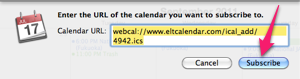
- Click 'Subscribe':
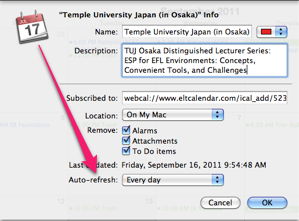
- Under 'Auto Refresh', select 'Every day' in case the the basic details change:
You can add this event to your Microsoft Outlook calendar.
- Click on the MS Outlook icon.
- See what happens.
- Tell us what happens. I don't have MS Outlook on a Windows computer, so I can't test it.
- If you click on the icon and nothing happens, do this:
- Right-click on the icon and save the file.
- According to Microsoft's support page, in Outlook's File menu, you should click Import and Export.
- Click to select Import an iCalendar or vCalendar file (*.vcs), and then click Next.
- Click to select the vCalendar file you've just saved, and then click Open.
Contact Temple University, Japan Campus
Website: www.tuj.ac.jp/grad-ed/seminars
Email QR Code: